
Integrations enable Jacky to communicate securely with third-party APIs and your local smart home. By setting up connections, you allow routines to read calendar schedules, monitor GitHub repository pull requests, control Spotify music playback, or interact with Home Assistant devices.
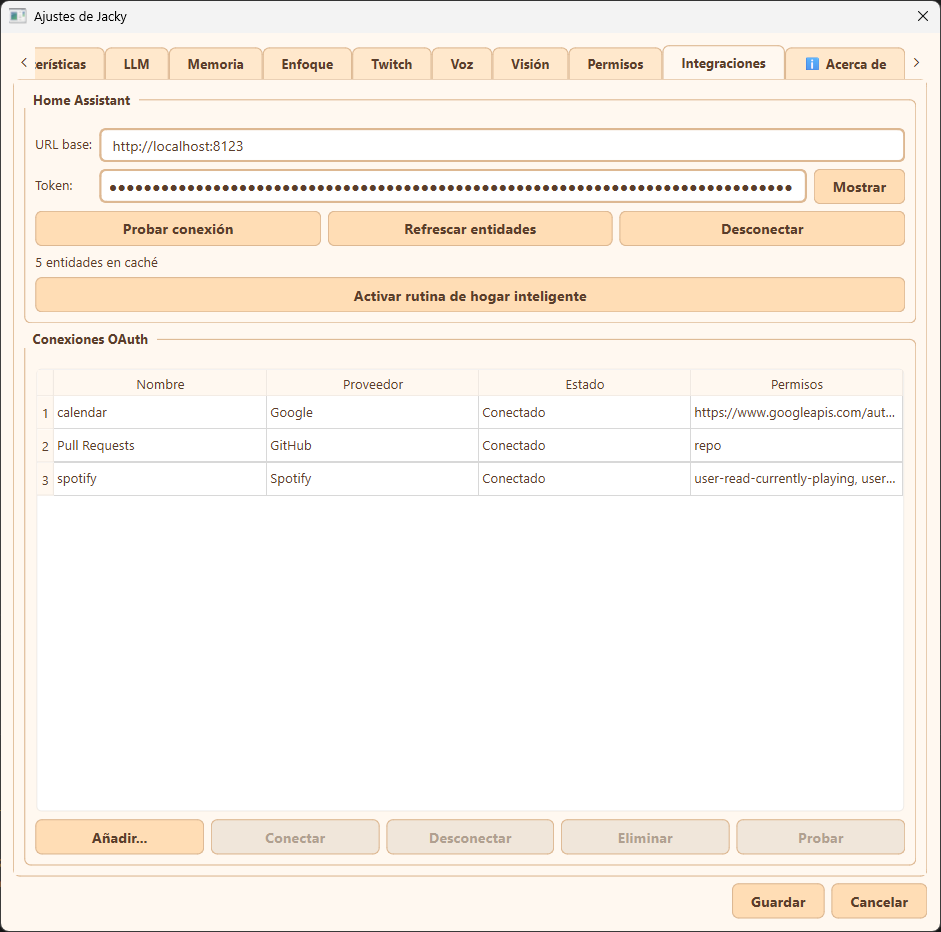
OAuth credentials, access tokens, and smart home credentials are saved locally on your device (stored encrypted-at-rest via the OS keyring like Windows Credential Manager or macOS Keychain). Your keys are never sent to any external server.
Home Assistant Integration
Jacky features a native integration with Home Assistant to control IoT devices in your home using natural language voice or text commands.
How it Works
When you trigger a command like "enciende la luz de la oficina" (or "turn on the office light"):
- Intention Match: The routine engine matches the keyword trigger and starts the Home Assistant routine.
- Entity Resolution: Jacky uses fuzzy token matching or LLM fallback to resolve the query to a specific device entity (e.g.,
light.office_main) from a locally cached list. - Service Dispatch: Jacky sends a REST API request directly to your Home Assistant instance to execute the action (e.g., calling the
light.turn_onservice). - IoT Control: Home Assistant processes the command and updates the physical device (e.g., sending the command to your smart bulb).
Setting Up Home Assistant
- Prepare Home Assistant:
-
Set up Home Assistant on another device (e.g., Raspberry Pi) or in a local Docker container.
Example command to run Home Assistant in Docker:
docker run -d \ --name homeassistant \ --privileged \ --restart=unless-stopped \ -e TZ=America/Mexico_City \ -v C:\ha-config:/config \ -p 8123:8123 \ --network=host \ ghcr.io/home-assistant/home-assistant:stable -
Integrate your devices. For Smart Life/Tuya devices, synchronize them using the Tuya integration in Home Assistant so they show up as entities.
-
- Generate Access Token:
- Go to your Home Assistant profile page, scroll down to Long-Lived Access Tokens, and click Create Token. Copy it immediately.
- Configure Jacky:
- Open Jacky's Settings -> Integrations tab.
- Enter your Base URL (e.g.,
http://localhost:8123or your local LAN IP). - Paste the Long-Lived Access Token.
- Test & Cache:
- Click Probar conexión (Test connection) to verify authentication.
- Click Refrescar entidades (Refresh entities) to build the local device cache.
- Click Activar rutina de hogar inteligente (Activate smart-home routine) to enable the default trigger keywords.
Permission Required: For security and privacy, you must explicitly enable the Control smart home (allow_smart_home) permission in the Permisos settings tab. Without this permission, smart home routine steps will fail.
OAuth 2.0 Connections
Catch events and manipulate third-party platform data directly from Jacky's routine engine.
Supported OAuth Applications
- Google Calendar: Connect your account to check upcoming schedules. Perfect for automatic routines that poll the Calendar API and announce events 5 minutes before they start.
- GitHub: Monitor pull requests, commits, and issue activity on your repositories.
- Spotify: Check the active track status, comment on songs in real-time, and manipulate your playback playlists.
Adding a New OAuth Connection
- Click Añadir... at the bottom of the connections table.
- Select your provider preset (Google, GitHub, Spotify, or Custom).
- Register a developer application on the target platform:
- Google: Create a Desktop App client ID via the Google Cloud Console.
- GitHub: Register an OAuth App. Use the displayed redirect URL in the configuration.
- Spotify: Create an application on the Spotify Developer Dashboard.
- Input your
Client IDand (if required)Client Secret. - Specify the authorization scopes you want to request.
- Click Conectar (Connect) to open a browser window and authorize the application. Once authorized, the status column in the table will update to Conectado (Connected).
Redirect URIs
When registering developer applications, configure the redirect target as follows:
- Desktop client:
http://localhost(or loopback addresses likehttp://127.0.0.1:<port>). - Default callback port for Jacky:
8765(http://127.0.0.1:8765/callback).
MCP Server
Jacky can also act as an MCP (Model Context Protocol) server, exposing its tools to external AI agents like Claude Desktop or Windsurf. This lets other agents make Jacky speak, show notifications, run routines, and more — all through the standard MCP SSE transport.
Configure MCP Server
Next Step: Create a Routine
Simply configuring an OAuth 2.0 integration only authorizes Jacky to communicate with the service. To allow your pet to actually access these events and respond to them, you must create a routine that references the configured integration.
Configure OAuth 2.0 Routines