Configure the core options of the companion app from the Settings (Ajustes) tab.
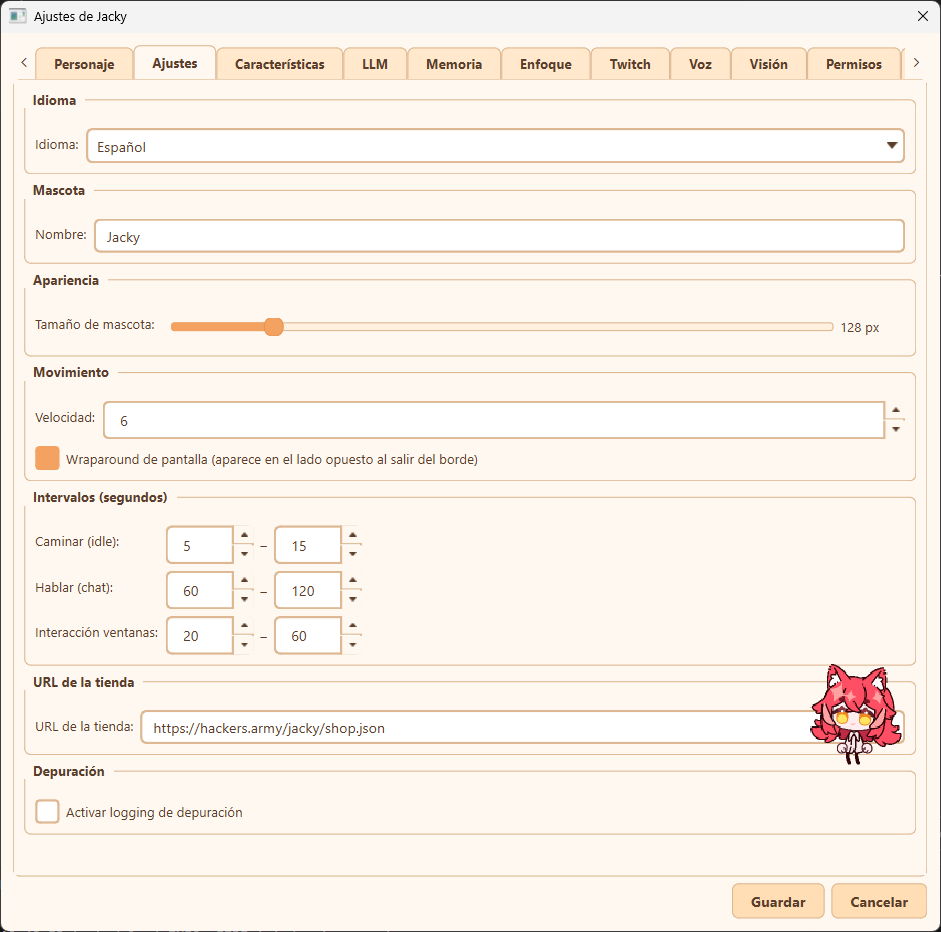
General settings tab overview
The following configuration options are available:
- Language (Idioma): Choose the language for the companion's user interface and chat (e.g., English or Spanish).
- Mascot Name (Nombre): Customize the displayed name of your companion (defaults to "Jacky").
- Appearance (Apariencia):
- Pet Size (Tamaño de mascota): Adjust the display size of the mascot using the slider. The default size is 128px.
- Movement (Movimiento):
- Speed (Velocidad): Adjust the speed at which your companion moves across the screen.
- Screen Wraparound (Wraparound de pantalla): Enable or disable screen wrapping. When enabled, your companion will teleport to the opposite side of the screen when walking past the edge instead of bouncing off the screen boundaries.
- Intervals (Intervalos): Define the min/max frequency (in seconds) for various companion actions:
- Walk (Caminar - idle): The idle movement interval cadence.
- Speak (Hablar - chat): The frequency with which the companion initiates random chat/speech events.
- Window Interaction (Interacción ventanas): The cadence at which the companion reacts or interacts with other open desktop windows.
- Shop URL (URL de la tienda): Specify the JSON endpoint for the custom companion cosmetic/item shop.
- Debugging (Depuración):
- Enable debug logging (Activar logging de depuración): Turn on verbose logging to assist in diagnosing issues.