
Configure the language model that powers Jacky's intelligence and responses.
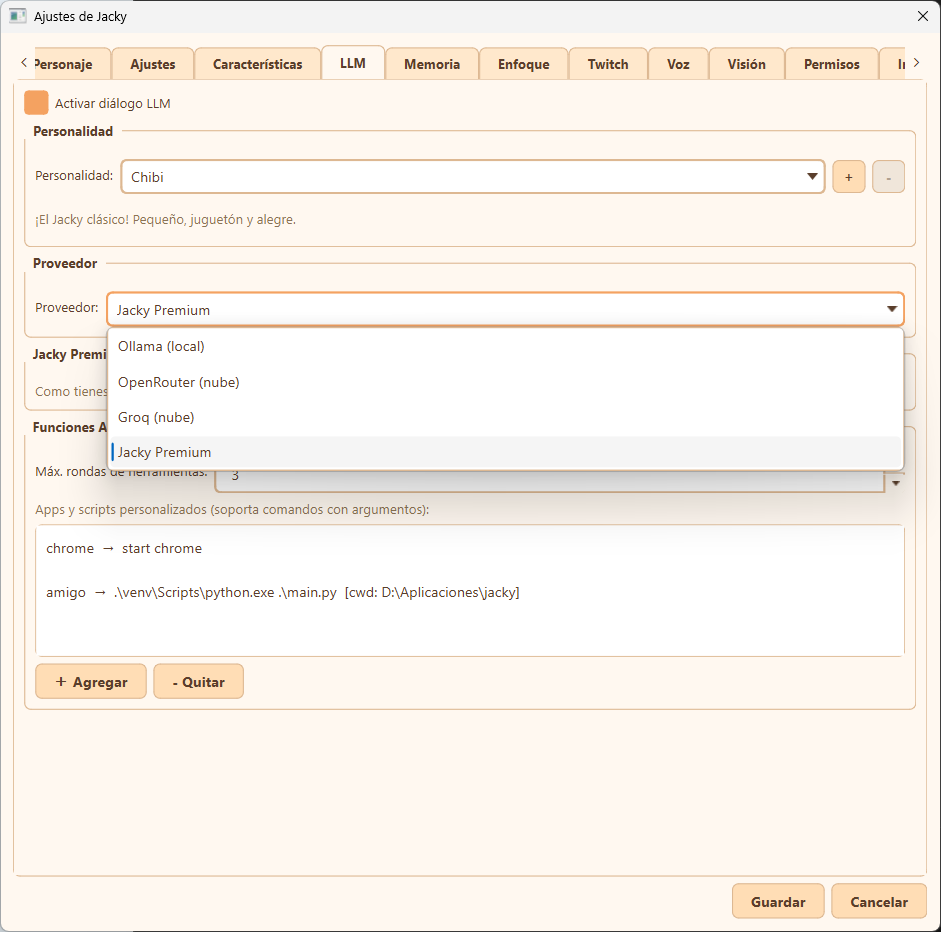
- Activate LLM Dialogue: Enable or disable LLM-powered chat features. When unchecked, Jacky's AI brain, tool loop, and random conversational responses are deactivated.
- Personality:
- Personality Selection: Choose from preset personalities (e.g., Chibi - the classic, small, playful, and cheerful mascot) to adjust Jacky's tone, voice, and behavior.
- Add / Remove: Use the
+button to create a new custom personality with custom prompt instructions, or the-button to delete a custom personality.
- Provider:
- Choose the API provider for the Large Language Model.
- Ollama (local): Run open-source models locally on your machine for complete offline privacy.
- OpenRouter (cloud): Route requests through OpenRouter's cloud api to access a wide variety of models. You can obtain an API key from OpenRouter.
- Groq (cloud): Fast cloud inference running open-source models at high speeds. You can obtain an API key from the Groq Console.
- Google AI Studio: Cloud inference using Google's Gemini models. You can obtain an API key from Google AI Studio.
- SambaNova (cloud): High-speed cloud inference with open-source models. Rate-limited by RPM and RPD quotas. You can obtain an API key from SambaNova.
- OpenAI: Cloud inference using OpenAI's GPT models. You can obtain an API key from OpenAI.
- Jacky Premium: A streamlined out-of-the-box cloud provider.
- Advanced Features:
- Max Tool Rounds: Define the maximum number of tool calls Jacky can execute in a single agentic loop (e.g., 3 rounds) before returning a final answer.
- Custom Apps & Scripts: Define custom app launchers and CLI scripts triggered by saying "Jacky open [app]".
- Custom launchers support commands with arguments (e.g.,
chrome -> start chrome) and a specific working directory context (e.g.,friend -> .\jacky.exewith[cwd: C:\jacky]). - Use the + Add and - Remove buttons below the list to manage your triggers.
- Custom launchers support commands with arguments (e.g.,
Compact tool mode
Jacky has a catalog of built-in tools (web search, opening apps, smart home control, routines, etc.) that are injected into the LLM prompt so the model knows what it can do. With all tools active, this can add up to over 6,000 tokens per request — a significant cost, especially with providers that have strict token limits.
Compact tool mode solves this problem. Instead of sending every full schema to the LLM, it sends only:
- A lightweight catalog (one line per tool with name and short description) — ~600 tokens.
- Two meta-tools:
search_toolsandrun_tool.
How it works
The typical flow with compact mode is 3 cheap rounds:
- The LLM receives your question and the compact catalog. If it needs a tool, it calls
search_tools("set a timer"). search_toolsreturns the names, descriptions, and exact parameters of matching tools — as text in the tool result, not as a second injected schema.- The LLM calls
run_tool("set_timer", {"duration_minutes": 5})to execute the found tool.
The search is deterministic (based on stem matching over tool names, routine triggers, and descriptions), not using the LLM to filter. Only tools the user has permission to execute are returned, so the model is never guided toward tools it can't use.
Enabling it
Check the Compact tool mode checkbox in the 🛠️ Tools sub-tab within the LLM tab. Enabled by default.
Recommended for: Providers with strict token-per-minute limits (Groq, SambaNova), small local models (Ollama), and users with many active tools or connected MCP servers. If your provider has generous limits and you prefer to avoid the extra search round, you can disable it — tools will be injected directly as full schemas.
Compact mode adds one extra tool-call round (the search), but saves thousands of tokens on every request. With low-cost or local providers, the tradeoff is almost always worth it.
External MCP servers
Jacky supports connecting external MCP (Model Context Protocol) servers to extend the LLM's available tools. This allows installing third-party tools — such as database access, external APIs, specialized file systems, etc. — and having Jacky use them natively within its agent loop.
Configuration
From the LLM tab, access the 🔌 MCP Servers sub-tab. From here you can:
- Add server: Create a new MCP server specifying name, transport (stdio / SSE / HTTP streamable), command or URL, and environment variables.
- Add from JSON: Import an existing MCP configuration in JSON format.
- Edit / Remove: Modify or delete existing servers.
- Reconnect all: Force reconnection of all servers.
Each server displays a status icon:
| Icon | Status |
|---|---|
| 🟢 | Connected |
| 🔴 | Error |
| ⚫ | Disabled |
| 🔑 | Missing auth token |
| 🔐 | Missing secret env var |
Supported transports
- stdio: Runs a local command on your machine. Ideal for MCP servers installed as npm/pip packages.
- SSE: Remote connection via Server-Sent Events.
- HTTP streamable: Remote connection via HTTP with streamable transport (the modern MCP standard).
Security
MCP servers can execute arbitrary code on your system. Only add servers you trust. Authentication tokens and environment variables marked as secret are stored in the system keyring, not in configuration files.
Tools from MCP servers are namespaced as mcp_<server_name>_<tool_name> to avoid collisions with Jacky's built-in tools.
Required permission
Using MCP tools requires the allow_mcp_tools permission, which is in the destructive permissions group and is disabled by default. You can enable it from the Permissions tab in settings.
When the permission is active and MCP servers are connected, MCP tools appear automatically in the tool catalog (visible in the 🛠️ Tools sub-tab) and work in both compact and normal mode.
Burn tokens (Smart self-correction)
Burn tokens is an optional mode that makes Jacky significantly smarter by adding extra reasoning and verification steps before responding. When enabled, Jacky will think more carefully, double-check its own work, and produce higher-quality answers — at the cost of using more tokens per conversation.
Burn tokens works with any provider (Ollama, OpenRouter, Groq, Google AI Studio, SambaNova, OpenAI, or Jacky Premium). It wraps around your chosen provider transparently — no extra setup needed.
How to enable it
Check the Burn tokens (Smart self-correction) checkbox in the LLM settings tab. When you turn it on, a set of sub-options appears below, each controlling a different intelligence layer. You can toggle individual layers on or off to find the right balance between quality and token usage.
What does Burn tokens do?
When active, Jacky runs several invisible self-correction layers before giving you a final answer:
- Chain-of-thought reasoning (CoT): Before answering, Jacky silently reasons through the question step by step, then uses that reasoning to craft a better response. This is like Jacky thinking out loud internally before speaking.
- Best-of-N candidate selection: Jacky generates multiple candidate answers (2 by default), scores each one for accuracy and quality, and picks the best. More candidates means better answers but more tokens used.
- Tool result verification: When Jacky uses a tool (like searching the web or opening an app), it checks whether the tool's result was actually useful for your question. If the result was irrelevant, Jacky tries a different approach instead of blindly repeating the tool's output.
- Lazy response detection and retry: If Jacky's first answer is lazy — like a refusal ("I can't do that") or too short when tools were available — it automatically retries up to 3 times with a critique prompt, pushing itself to actually do the work.
- Conversation summarization: In long conversations, Jacky automatically summarizes older messages into a compact summary so it doesn't lose track of context. This keeps Jacky's memory sharp even in extended chats.
- Higher response length limit: Burn tokens raises the maximum response length (600 tokens by default, up from the standard limit), allowing Jacky to give more detailed and complete answers.
Burn tokens settings
| Setting | What it does | Range |
|---|---|---|
| Burn tokens | Master toggle — enables or disables all self-correction layers | On / Off |
| Chain-of-thought (CoT) | Adds a hidden reasoning step before answering | On / Off |
| Max tokens per response | Maximum length of Jacky's responses | 200 – 2000 |
| Best-of-N (candidates) | Number of candidate answers Jacky generates and picks from | 1 – 4 |
| Verify tool results | Checks whether each tool result was actually relevant | On / Off |
| Summarize conversation after N turns | Compresses older conversation history after this many turns | 4 – 30 |
Recommended for: Complex questions, tool-heavy tasks (like web searches or screen interactions), and long conversations. If you're using a free or low-cost provider, the extra token usage is usually negligible. If you're on a tight token budget, try disabling Best-of-N or Tool verification while keeping CoT on — that gives you most of the quality boost at a fraction of the cost.
Token usage: Burn tokens can use up to ~1,000–1,500 extra tokens per request in the worst case (all layers enabled, long conversation, multiple tool calls). With cloud providers, this means slightly higher API costs. With local providers like Ollama, it only means slightly longer response times.