
Gamer Mode is designed for Jacky to behave discreetly and silently while you play video games or use applications that require your full attention. Jacky retreats to the background and stops doing anything that might interfere with your experience.
What does Gamer Mode do?
When you enable Gamer Mode, Jacky automatically applies the following changes:
Hides behind your windows
Jacky stops being always visible on top of other applications. This prevents him from appearing over your full-screen games or software that requires total attention.
Stops moving windows
Jacky won't push, shake, or manipulate any active window. This way he won't interrupt your game or accidentally move something important.
Complete silence
Both synthesized voice and all sound effects are fully muted. Speech bubbles won't appear either, to avoid visual distractions.
No physics (gravity disabled)
Gravity is turned off so Jacky doesn't fall or block your game window title bars.
Pauses background routines
All scheduled routines are temporarily paused. Jacky won't run any automatic tasks while you're gaming.
How to activate it?
You can enable Gamer Mode in two ways:
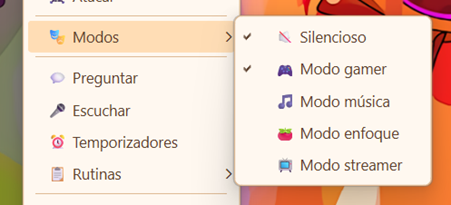
- Context menu: Right-click on Jacky anywhere on the screen and select Gamer Mode.
- Settings: Open Jacky's settings window and select Gamer Mode.
State saving and restoration
One of the most useful features of Gamer Mode is that it remembers your previous configuration:
- When you enable Gamer Mode, Jacky saves your current settings for "Always on Top", "Window Push", "Silent Mode", and "Gravity" in memory.
- When you disable Gamer Mode, everything goes back exactly to how it was. You don't need to reconfigure anything manually.
- Background routines also resume automatically.
Do you game often? Gamer Mode is perfect for gaming sessions, video editing, 3D rendering, or any other activity that requires full screen and maximum concentration.
When to use it?
Gamer Mode is ideal for:
- Playing full-screen or borderless video games.
- Using video editing, 3D modeling, or design software that takes up the entire screen.
- Watching movies or series in full screen.
- Any situation where you don't want Jacky to appear over your content or interact with your windows.