
Jacky can adapt to your current desktop activity through specialized Operation Modes. These modes allow you to customize his visibility, sound output, window interaction, pet care gameplay, and background routine execution to avoid distractions during gaming, working, listening to music, or broadcasting.
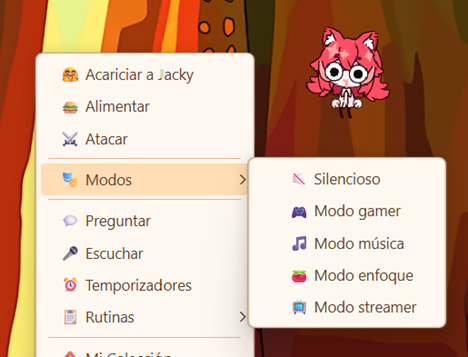
Exclusivity Rule: The active modes (Gamer, Music, Focus, and Streamer) are mutually exclusive. Enabling any of these modes will automatically disable the other active modes to prevent conflicting behaviors. Tamagochi Mode and Silent Mode can run alongside any other mode.
🔇 Silent Mode
Completely mutes Jacky's voice and sounds. Speech bubbles still appear, but no audio plays. Perfect for shared spaces or when you need discretion.
Silent Mode Settings
🎮 Gamer Mode
Designed for gaming and full-screen applications. Jacky hides behind your windows, disables window interaction, pauses background routines, and automatically restores your settings when you're done.
Gamer Mode Settings
🎵 Music Mode
Turns Jacky into your music companion. Detects what you're listening to on Spotify, YouTube, Apple Music, and other players. Dances to the beat, comments on songs with AI, and shows a floating media player with controls.
Music Mode Settings
⏱️ Focus Mode
Pomodoro timer with distraction detection. Jacky monitors your active apps using whitelists and blacklists, and alerts you when you get distracted. Includes work animations and quick app classification.
Focus Mode Settings
📺 Streamer Mode
Connects Jacky to your Twitch channel for live reactions to followers, subscriptions, bits, and raids. Includes Twitch authentication, event grouping, and automatic offline detection.
Streamer Mode Settings
🐾 Tamagochi Mode
A virtual pet simulation that tracks four stats — hunger, happiness, training, and toilet — which decay over time. Feed, pet, train, and clean Jacky to keep him healthy and happy. Enabled from the Settings → Features tab, not the context menu.
Tamagochi Mode Settings