Configure settings for linking Jacky to your Twitch channel for live streaming interactions.
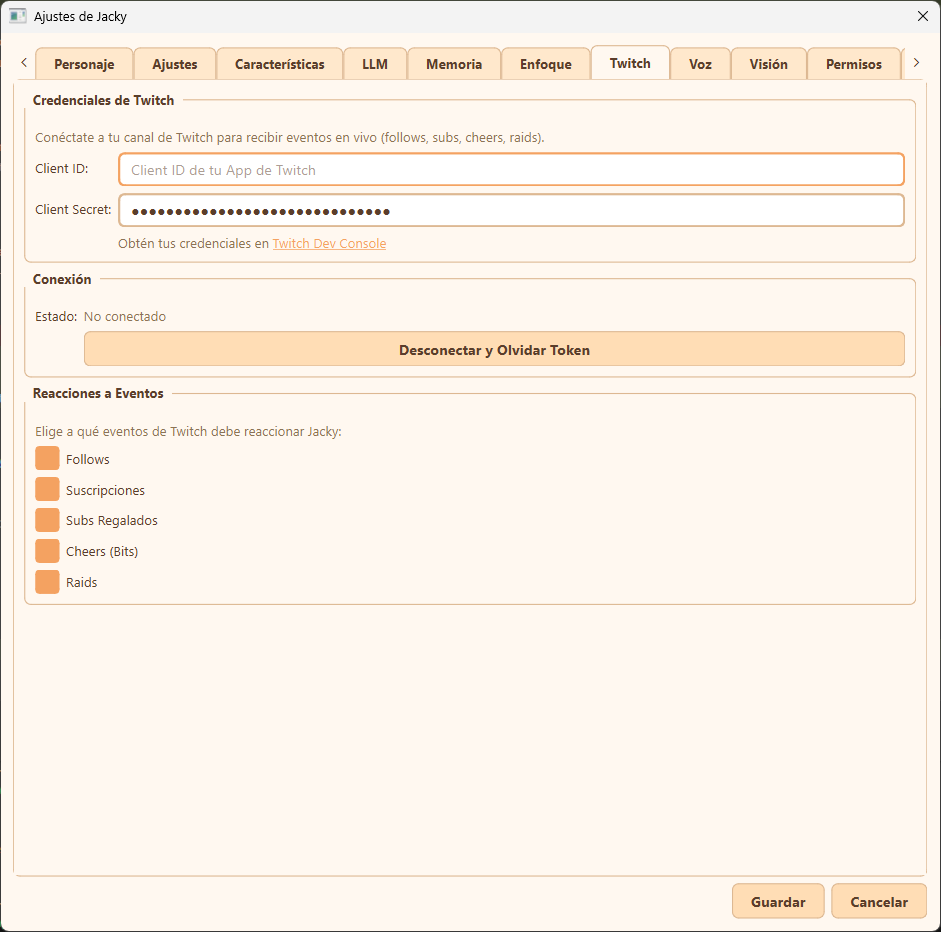
Twitch settings tab overview
Configuration Options
Credenciales de Twitch (Twitch Credentials)
To enable Twitch integrations, you must provide your own Twitch Developer application credentials. This ensures you do not share rate limits with other Jacky users:
- Client ID: The unique identifier for your Twitch Developer Application.
- Client Secret: The secret key generated for your application. Keep this private.
- Obtén tus credenciales en Twitch Dev Console: A link directing you to dev.twitch.tv/console to register your app.
Conexión (Connection)
Shows the connection status of the service and allows you to clear tokens:
- Estado: The current connection status (
No conectado(Not connected),Conectando...(Connecting...), orConectado como {canal}(Connected as )). - Desconectar y Olvidar Token (Disconnect and Forget Token): Logs out of Twitch, closes the EventSub WebSocket connection, and deletes the local access/refresh tokens.
Reacciones a Eventos (Event Reactions)
Fine-grained control over which live alerts trigger reactions from Jacky. Check the boxes to enable or disable specific alerts:
- Follows: Triggers when a viewer follows your channel.
- Suscripciones: Triggers when a viewer subscribes to your channel.
- Subs Regalados: Triggers when a subscriber gifts subscriptions to the community.
- Cheers (Bits): Triggers when a viewer cheers with Bits.
- Raids: Triggers when another broadcaster raids your channel with their viewers.