
Control what actions your companion is allowed to perform on your screen, with your windows, or via external system executions.
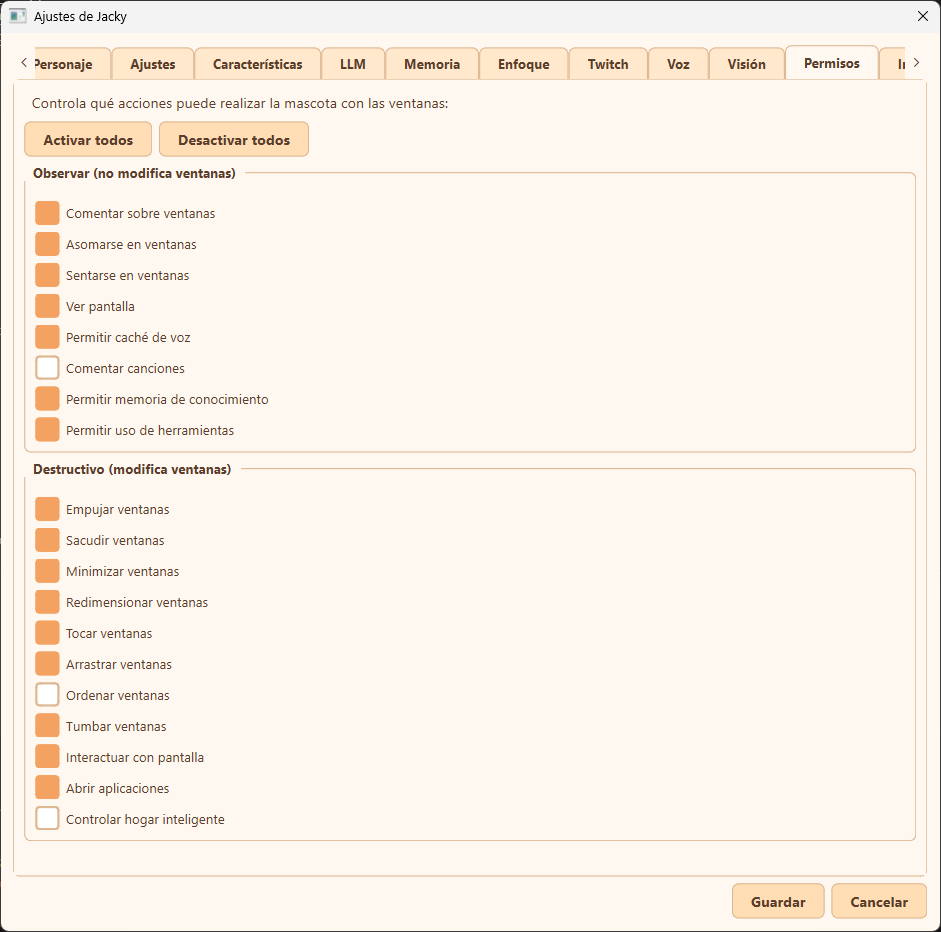
Permissions tab overview
Global Controls
At the top of the tab, you will find two quick-action buttons:
- Enable All (Activar todos): Enables every single permission in both lists.
- Disable All (Desactivar todos): Disables all permissions. This effectively turns off any interactive features.
Observe (Non-destructive)
These permissions allow Jacky to watch, analyze, and comment on desktop activity without modifying any active windows or sending system commands.
- Comment on windows (
allow_comment): Allows Jacky to make comments about your open windows. - Peek at windows (
allow_peek): Allows the pet to peek behind the edges of windows. - Sit on windows (
allow_sit): Allows the pet to sit on the title bar of windows. - See screen (
allow_vision): Grants permission to capture and analyze the screen using LLM vision (e.g., when asked "what do you see?"). - Allow voice cache (
allow_cache): Allows saving text-to-speech audio files locally to optimize performance and reduce API requests. - Comment on songs (
allow_comment_music): Allows Jacky to make comments about the currently playing song in music mode. - Allow knowledge memory (
allow_knowledge): Extracts long-term facts about you from chat sessions and injects them into the LLM context. Disabled by default for privacy. - Allow tool calling (
allow_tools): Lets the LLM use tools (web search, timers, screen actions) directly instead of relying solely on the local intent classifier.
Destructive (Modifies Windows / Executes Commands)
These permissions allow Jacky to manipulate your desktop layout, simulate interactions, control hardware, or run applications.
Warning
Enabling options in this section gives the desktop companion active control over your desktop environment and system.
- Push windows (
allow_push): Allows Jacky to push nearby windows out of the way while moving. - Shake windows (
allow_shake): Allows the pet to physically shake windows rapidly. - Minimize windows (
allow_minimize): Allows Jacky to minimize windows on the desktop. - Resize windows (
allow_resize): Allows Jacky to shrink or enlarge windows. - Knock on windows (
allow_knock): Allows the pet to flash a window and bring it to the front. - Drag windows (
allow_drag): Allows Jacky to drag a window across the screen while walking. - Tidy windows (
allow_tidy): Allows organizing all open windows into a clean grid layout. - Topple windows (
allow_topple): Allows Jacky to push windows in a domino chain. - Interact with screen (
allow_screen_interact): Allows searching for and clicking/typing into elements on your screen using simulated events. - Open applications (
allow_run_command): Allows the pet to run pre-approved system shell commands to open apps (e.g., Notepad, Calculator). Only commands mapped in the config's custom applications list are permitted. - Control smart home (
allow_smart_home): Allows Jacky to interact with and control IoT devices connected to your Home Assistant instance. Disabled by default for safety.